

GZIP Compression
GZIP reduces the size of data transmitted over a network. It is particularly useful for HTTP responses containing text such as HTML, CSS, JavaScript, JSON, XML, and plain text.
This guide covers GZIP, DEFLATE, zlib's streaming compression API, and how they work together in an HTTP server.
GZIP
GZIP is a file and stream format that contains DEFLATE-compressed data along with metadata.
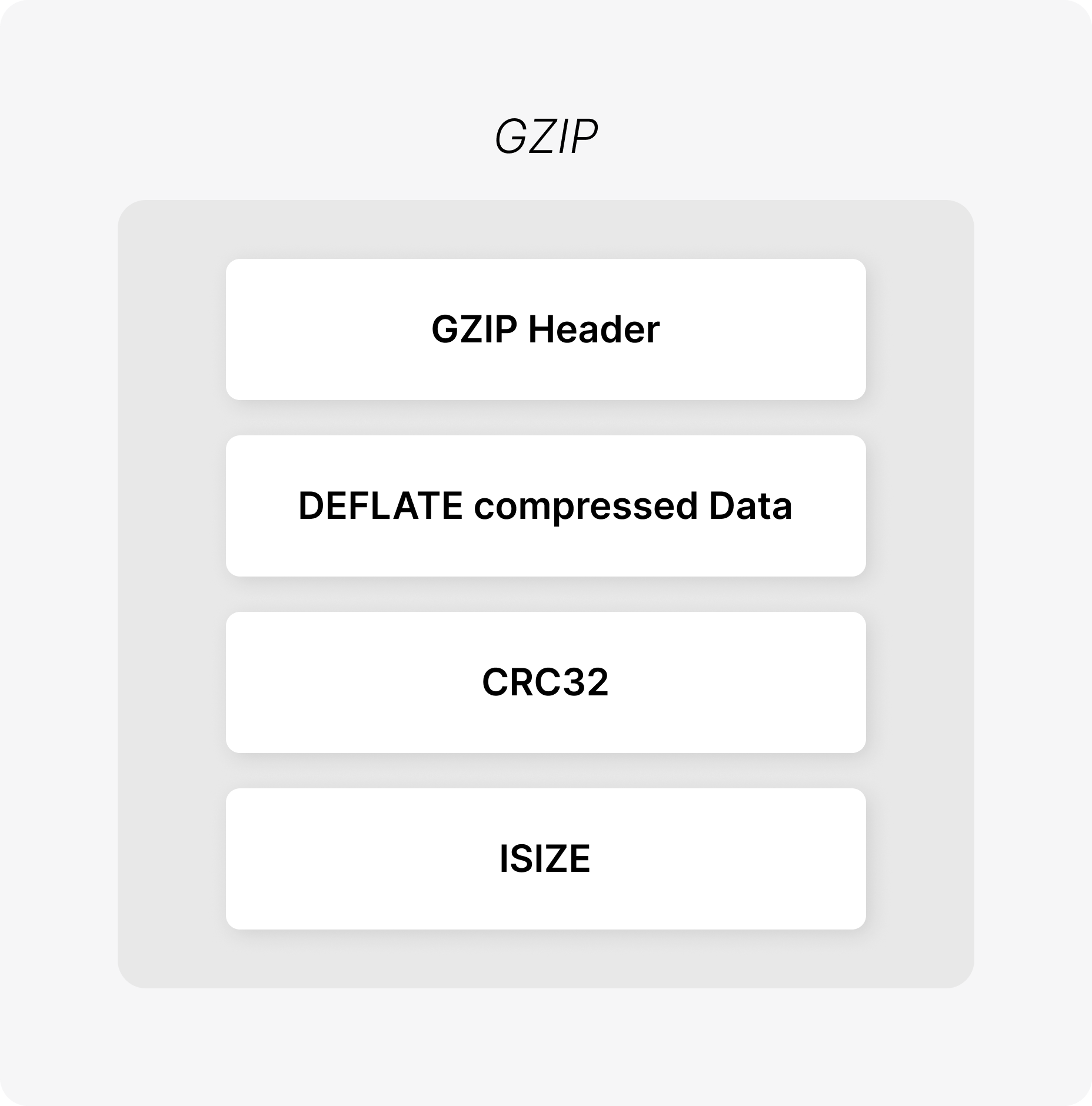
| Component | Description |
|---|---|
GZIP Header | Identifies the data as GZIP and stores compression/metadata information. |
DEFLATE Compressed Data | The actual data compressed using the DEFLATE algorithm. |
CRC32 | Error-check value used to verify the integrity of the original data. |
ISIZE | Size of the original uncompressed data (modulo 2³²). |
DEFLATE is the compression algorithm and GZIP is the format that wraps the compressed data.
When using zlib, the GZIP header and trailer are generated automatically.
DEFLATE
DEFLATE combines two techniques:
- LZ77-style compression - replaces repeated data with references to previously seen data.
- Huffman coding - represents frequently occurring symbols using fewer bits.
For example:
ABCABCABCABCInstead of storing every occurrence independently, repeated sequences can be represented using references to earlier data.
These techniques work particularly well for text-based resources.
GZIP and HTTP
A client indicates that it supports GZIP using Accept-Encoding:
GET /sample.txt HTTP/1.1
Host: localhost:8001
Accept-Encoding: gzip
The server can then return:
HTTP/1.1 200 OK
Content-Encoding: gzip
Content-Type: text/plain

<gzip compressed bytes>
Content-Encoding: gzip tells the client that the response body is GZIP-compressed.
Streaming Compression
A server does not need to load an entire response into memory before compressing it.
Instead of:
Read entire file
      ↓
Compress entire file
      ↓
Send response
streaming compression processes the response incrementally:
Input chunk
    ↓
Compress
    ↓
Send
    ↓
Next chunk
    ↓
Compress
    ↓
Send
    ...
The compressor maintains its state between chunks, allowing large responses to be processed without holding the entire response in memory.
Compression Lifecycle
A streaming GZIP compressor follows this lifecycle:
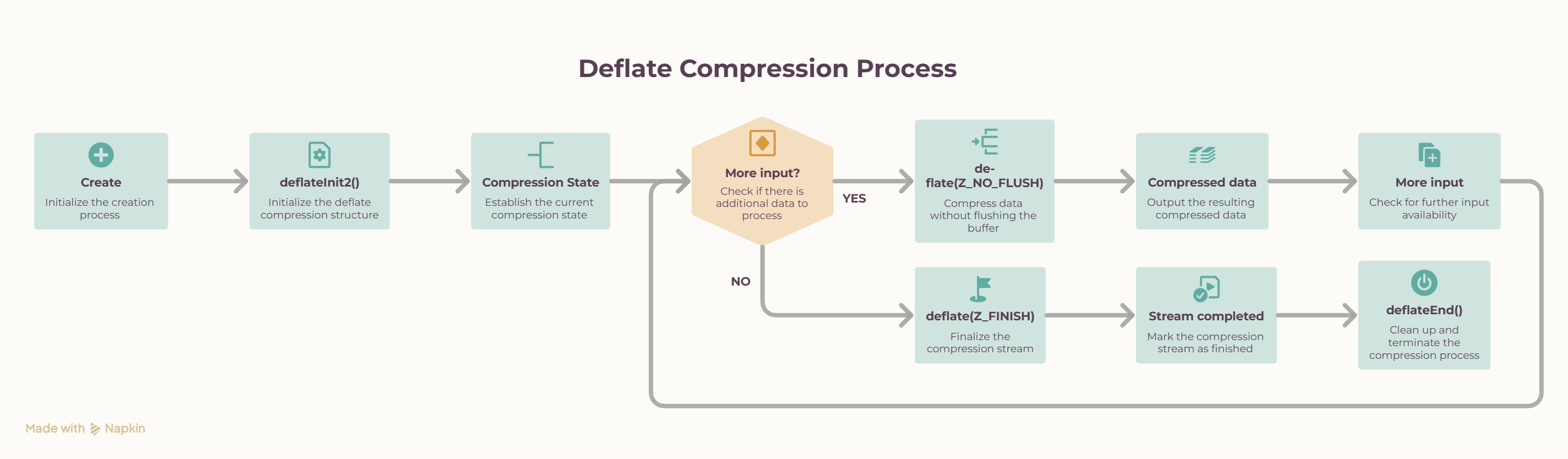
The important point is that deflateInit2() is called once. The same z_stream is then reused across multiple calls to deflate().
deflateInit2()
      ↓
   Input
      ↓
deflate(Z_NO_FLUSH)
      ↓
   Output
      ↓
   More input
      ↓
deflate(Z_NO_FLUSH)
      ↓
   ...
      ↓
Input closes
      ↓
deflate(Z_FINISH)
      ↓
Z_STREAM_END
      ↓
deflateEnd()
zlib
zlib is a C library that provides compression and decompression functionality.
Include zlib with:
#include <zlib.h>On Debian or Ubuntu:
sudo apt install zlib1g-devWhen compiling:
gcc main.c -lzThe -lz option links the program with zlib.
zlib Compression API
1. deflateInit2()
int deflateInit2(
    z_streamp strm,
    int level,
    int method,
    int windowBits,
    int memLevel,
    int strategy
);
deflateInit2() initializes a DEFLATE compression stream and allocates the internal state required by subsequent deflate() calls.
Important Parameters
| Parameter | Purpose |
|---|---|
strm | Pointer to the z_stream structure that stores compression state. |
level | Controls the compression level. Values range from -1 to 9. |
method | Specifies the compression method. Use Z_DEFLATED. |
windowBits | Controls the DEFLATE window size and wrapper format. |
memLevel | Controls the amount of memory used by the compressor. Values range from 1 to 9; 8 is the default. |
strategy | Controls the compression strategy. Z_DEFAULT_STRATEGY is suitable for general-purpose data. |
level
Controls the trade-off between compression ratio and compression speed:
| Value | Meaning |
|---|---|
-1 | Use the default compression level (Z_DEFAULT_COMPRESSION). |
0 | No compression; data is stored. |
1 | Fastest compression with lower compression ratio. |
1–8 | Increasing compression effort. |
9 | Maximum compression effort; generally slower. |
The implementation accepts:
-1 <= level <= 9method
Specifies the compression algorithm.
Z_DEFLATEDis the standard DEFLATE compression method supported by zlib.
windowBits
Controls both the DEFLATE sliding-window size and the wrapper format.
 MAX_WBITS       → zlib-wrapped DEFLATE
-MAX_WBITS       → raw DEFLATE
 MAX_WBITS + 16  → GZIP-wrapped DEFLATE
The implementation uses:
16 + MAX_WBITSto produce a GZIP-wrapped DEFLATE stream.
memLevel
Controls how much memory zlib uses internally.
1 → lower memory usage
8 → default
9 → higher memory usage
Higher values can improve performance for some workloads but require more memory.
strategy
Controls how zlib searches for compression opportunities.
Common strategies include:
Z_DEFAULT_STRATEGY → General-purpose compression
Z_FILTERED         → Data produced by filters/predictors
Z_HUFFMAN_ONLY     → Huffman coding without string matching
Z_RLE               → Run-length encoding oriented
Z_FIXED             → Use fixed Huffman codes
For general HTTP response data, the implementation uses:
Z_DEFAULT_STRATEGYReturn Value
deflateInit2() returns a status code indicating whether the compression stream was initialized successfully.
| Return Value | Meaning |
|---|---|
Z_OK | Compression stream initialized successfully. |
Z_MEM_ERROR | Insufficient memory to initialize the compressor. |
Z_STREAM_ERROR | One or more parameters are invalid. |
Z_VERSION_ERROR | The zlib version is incompatible with the version expected by the application. |
When Can These Errors Occur?
Z_MEM_ERROR
Occurs when zlib cannot allocate the memory required for the compression state.
deflateInit2()
      ↓
memory allocation fails
      ↓
Z_MEM_ERROR
Z_STREAM_ERROR
Occurs when an invalid parameter is supplied, such as an invalid compression level, method, or configuration.
invalid parameter
      ↓
deflateInit2()
      ↓
Z_STREAM_ERROR
Z_VERSION_ERROR
Occurs when the zlib version available at runtime is incompatible with the version expected by the application.
incompatible zlib version
      ↓
deflateInit2()
      ↓
Z_VERSION_ERROR
Example
if (deflateInit2(
        &gzip->stream,
        level,
        Z_DEFLATED,
        16 + MAX_WBITS,
        8,
        Z_DEFAULT_STRATEGY
    ) != Z_OK) {

    logger(LOG_ERROR,
           "xps_gzip_create()",
           "deflateInit2() failed");

    /* Cleanup */
    ...
}
The stream must be successfully initialized before calling deflate().
2. deflate()
int deflate(z_streamp strm, int flush);deflate() performs the actual compression.
Before calling it, configure the input and output fields of z_stream:
stream.next_in   = input;
stream.avail_in = input_length;

stream.next_out  = output;
stream.avail_out = output_size;
z_stream
The same z_stream is reused throughout the compression process.
The four important fields are:
| Field | Purpose |
|---|---|
next_in | Pointer to the next input byte |
avail_in | Number of input bytes available |
next_out | Pointer to the output buffer |
avail_out | Space remaining in the output buffer |
After deflate() returns, zlib updates avail_in and avail_out to reflect the data consumed and produced.
For example:
Output buffer = 4096 bytes
avail_out     = 3000 bytes

Compressed output = 4096 - 3000
                   = 1096 bytes
Flush modes
The implementation primarily uses:
Z_NO_FLUSHwhile more input is expected, and:
Z_FINISHwhen no more input remains.
Other modes include Z_SYNC_FLUSH and Z_FULL_FLUSH, but they are not required for normal streaming compression here. These are explained below
Return values
Z_OK— compression is progressingZ_STREAM_END— compression has finishedZ_STREAM_ERROR— invalid stream stateZ_BUF_ERROR— zlib could not make progress with the supplied buffers
Z_NO_FLUSH
deflate(&stream, Z_NO_FLUSH);Z_NO_FLUSH is used while more input is expected.
Input chunk
    ↓
Z_NO_FLUSH
    ↓
Compressed output
    ↓
Input chunk
    ↓
Z_NO_FLUSH
    ↓
Compressed output
    ↓
...
The same z_stream is reused for every chunk, allowing zlib to maintain compression state across the stream.
Z_FINISH
deflate(&stream, Z_FINISH);Z_FINISH is used when no more input will be supplied. It tells zlib to finish the stream and produce any remaining compressed data.
A successful completion eventually returns:
Z_STREAM_ENDThis is different from deflateEnd():
Z_FINISH
    ↓
Complete the compressed stream

deflateEnd()
    ↓
Release zlib resources
deflateEnd()
int deflateEnd(z_streamp strm);deflateEnd() releases the resources associated with the compression stream.
It should be called after compression has been completed:
deflateInit2()
      ↓
deflate(..., Z_NO_FLUSH)
      ↓
More input
      ↓
deflate(..., Z_NO_FLUSH)
      ↓
Input closes
      ↓
deflate(..., Z_FINISH)
      ↓
Z_STREAM_END
      ↓
deflateEnd()
Complete Compression Flow
             xps_gzip_create()
                    ↓
              deflateInit2()
                    ↓
               z_stream
                    ↓
              Input arrives
                    ↓
          gzip_sink_handler()
                    ↓
           gzip_compress()
                    ↓
              deflate()
                    ↓
          Compressed output
                    ↓
           transfer_buff
                    ↓
        gzip_source_handler()
                    ↓
             Send downstream
                    ↓
             More input?
             /          \
           YES           NO
            │             │
            │         Z_FINISH
            │             │
            │       Final output
            │             │
            └───────┬─────┘
                    ↓
               deflateEnd()
The key idea is simple: initialize the stream once, feed it input in chunks, finish it when the input closes, and then release its resources.