

Stage 19: Gzip Compression
Recap
In the previous phase, we implemented the HTTP request/response parsers, the config module, and directory browsing, giving the server a complete picture of what a client is asking for and how to reply.
We also have a working pipe mechanism (xps_pipe_source / xps_pipe_sink) that lets independent modules pass buffers of data between each other without knowing about one another directly.
Learning Objectives
We will learn how gzip compression works at a high level, and how the
zliblibrary exposes it through thedeflatestreaming API.We will implement an
xps_gzipmodule that sits in the pipe chain as a transformation stage reading raw bytes on one end and writing compressed bytes out the other, without the rest of the server needing to care that compression is happening.We will make gzip configurable per route, including whether compression is enabled, the zlib compression level, and which MIME types are eligible for compression.
We will integrate gzip negotiation into the HTTP response path so that compression is only used when the client advertises
gzipthroughAccept-Encodingand the requested file has a configured compressible MIME type.
PRE-REQUISITE READING
Read about GZIP.
Revisit the Pipe module (Stage 10) xps_gzip is built entirely on top of xps_pipe_source_t & xps_pipe_sink_t.
Introduction
Up to this stage, data flowing through the server, such as file contents and upstream responses, is piped from a source to a sink unchanged.
Gzip compression introduces a new kind of pipe stage: one that has both a sink to receive uncompressed input and a source to emit compressed output. The zlib library performs the actual transformation between these two endpoints.
Conceptually, the module behaves like a middle-man in a pipe chain:
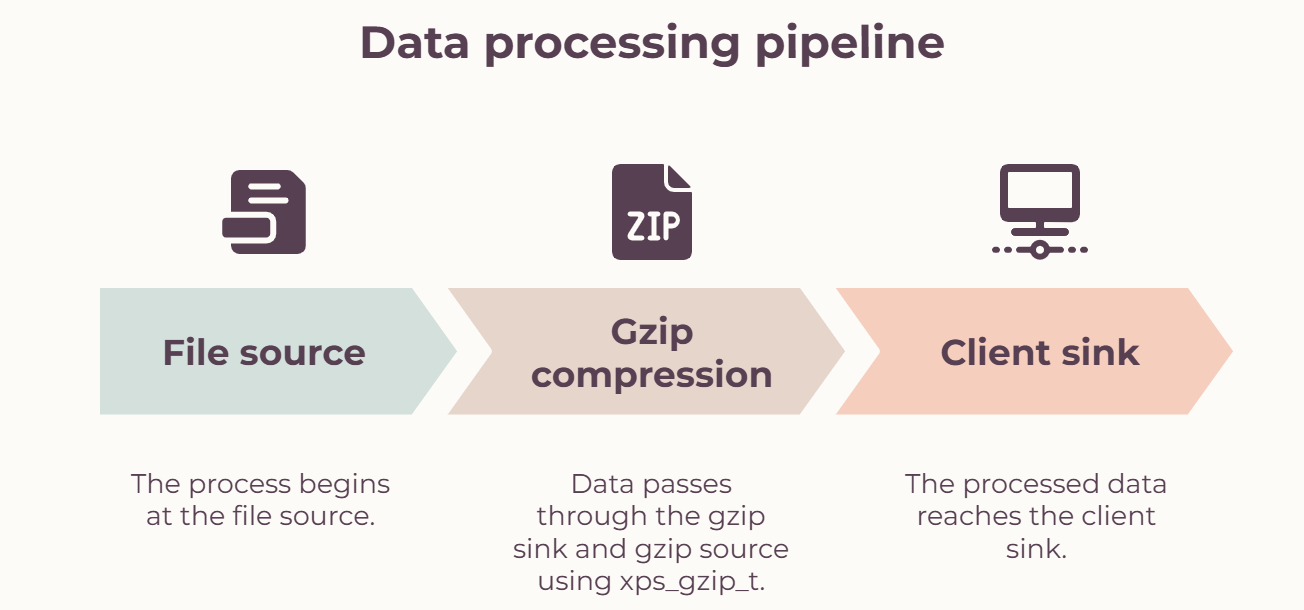
Data written into the gzip sink is buffered and compressed using deflate(). The compressed data is then made available through the gzip source for the downstream module to read.
Unlike a normal compressor that requires the complete input before compression, zlib's deflate API supports streaming compression. Data can be provided in chunks using next_in and avail_in, while compressed data is written to buffers using next_out and avail_out.
When the file source has no more data to send, deflate() is called with Z_FINISH instead of Z_NO_FLUSH. This allows zlib to finish the compression stream and write the gzip trailer.
While the upstream handles its own compression because it's a Python server, there are no changes required in that flow.
File Structure

Design
For implementing gzip compression, a new module named xps_gzip is created.
A new struct named xps_gzip_t represents one gzip transformation instance. The module contains both a pipe source and a pipe sink so that it can be inserted between an upstream producer and a downstream consumer.
Implementation
In this stage we will be creating the new xps_gzip module. The main implementation is contained in xps_gzip.c.
xps_gzip Module
xps_gzip.h
The header file contains the definition of xps_gzip_t and declarations for the functions provided by the gzip module.
expserver/src/disk/xps_gzip.h
#ifndef XPS_GZIP_H

#define XPS_GZIP_H

#include "../xps.h"

#include <zlib.h>

struct xps_gzip_s {

    z_stream stream;
    xps_pipe_source_t *source;
    xps_pipe_sink_t *sink;
    xps_buffer_t *transfer_buff;
    size_t total_in_len;
    size_t total_out_len;

};

xps_gzip_t *xps_gzip_create(int level);

void xps_gzip_destroy(xps_gzip_t *gzip);
The xps_gzip_t structure stores everything required for one compression instance.
The stream field stores the state required by zlib. The source and sink fields expose the two endpoints through which data flows into and out of the gzip module.
transfer_buff temporarily stores compressed data until it can be consumed by the downstream module.
xps_gzip.c
The main functions introduced in the xps_gzip module are xps_gzip_create(), xps_gzip_destroy(), gzip_compress(), and the source/sink callback handlers.
Let’s see how these functions work.
xps_gzip_create()
xps_gzip_create() creates and initializes an xps_gzip_t instance for a given compression level.
The compression level can range from 0 to 9. A value of -1 can also be used to select the default zlib compression level.
- First validate the compression level.
xps_gzip_t *xps_gzip_create(int level) {

if (level < -1 || level > 9) {

    logger(LOG_ERROR, "xps_gzip_create()", "invalid compression level %d", level);
    return NULL;
}
...
}
Allocate memory for the gzip structure and initialize the zlib stream fields.
Create the source that will provide compressed output.
gzip->source = xps_pipe_source_create((void *)gzip, gzip_source_handler, gzip_source_close_handler);

if (gzip->source == NULL) {

/* cleanup + return NULL */

}- Create the sink that will receive uncompressed input.
gzip->sink = xps_pipe_sink_create((void *)gzip, gzip_sink_handler, gzip_sink_close_handler);

if (gzip->sink == NULL) {

/* cleanup + return NULL */

}- Initialize the zlib compression stream using
deflateInit2().
if (deflateInit2(&(gzip->stream), level, Z_DEFLATED, 16 + MAX_WBITS, 8, Z_DEFAULT_STRATEGY) != Z_OK) {

/* cleanup + return NULL */

}
The windowBits value is important here. Using 16 + MAX_WBITS tells zlib to generate gzip-formatted output instead of raw DEFLATE or the normal zlib-wrapped format.
Finally, the sink is marked as ready because the gzip module is ready to receive its first chunk of data.
gzip->sink->ready = true;

gzip->transfer_buff = NULL;

gzip->total_in_len = 0;

gzip->total_out_len = 0;

return gzip;
All allocated resources should be cleaned up if any initialization step fails. This prevents a partially initialized gzip instance from leaking resources.
xps_gzip_destroy()
xps_gzip_destroy() releases the resources associated with a gzip instance.
expserver/src/disk/xps_gzip.c
void xps_gzip_destroy(xps_gzip_t *gzip) {

    assert(gzip != NULL);
    deflateEnd(&(gzip->stream));
    xps_pipe_source_destroy(gzip->source);
    xps_pipe_sink_destroy(gzip->sink);

if (gzip->transfer_buff)

    xps_buffer_destroy(gzip->transfer_buff);
    free(gzip);

}
First, deflateEnd() releases the internal resources allocated by zlib.
The source and sink pipe endpoints are then destroyed. If a compressed buffer is still waiting to be forwarded, it is also destroyed before finally freeing the gzip structure.
gzip_compress()
gzip_compress() is responsible for performing the actual compression.
It is called in two situations:
With
flush = falsewhen more input may still arrive.With
flush = truewhen the upstream sink has been closed and the gzip stream needs to be finalized.
When flush is false, the function reads the currently available data from the sink.
xps_buffer_t *in_buff = NULL;

if (!flush) {
    in_buff = xps_pipe_sink_read(gzip->sink, gzip->sink->pipe->buff_list->len);

if (in_buff == NULL) {
    /* log error, return */
}

} else {
    in_buff = xps_buffer_create(1, 0, NULL);

if (in_buff == NULL) {
    /* log error, return */
}

}
When flush is true, no new input is required. An empty buffer is created so that the function can perform the final deflate() operation.
The zlib stream is then configured with the input buffer and the appropriate flush mode.
gzip->stream.avail_in = in_buff->len;

gzip->stream.next_in = in_buff->data;

int flush_stream = flush ? Z_FINISH : Z_NO_FLUSH;
A buffer list is used to collect the compressed output because one call to deflate() may produce more data than can fit in a single output buffer.
do {
    xps_buffer_t *out_buff =
    xps_buffer_create(DEFAULT_BUFFER_SIZE, 0, NULL);

    if (out_buff == NULL) {

        /* cleanup, return */

    }

    gzip->stream.avail_out = out_buff->size;

    gzip->stream.next_out = out_buff->data;

    int error = deflate(&(gzip->stream), flush_stream);

    assert(error != Z_STREAM_ERROR);

    out_buff->len = out_buff->size - gzip->stream.avail_out;

    if (out_buff->len > 0)

        xps_buffer_list_append(out_buff_list, out_buff);

    else

        xps_buffer_destroy(out_buff);

} while (gzip->stream.avail_out == 0);

assert(gzip->stream.avail_in == 0);
If the output buffer becomes completely full, another output buffer is allocated and deflate() is called again.
Once all available input has been consumed, the individual output buffers are combined into a single compressed buffer.
xps_buffer_t *compressed_buff = NULL;

if (out_buff_list->len > 0)

    compressed_buff = xps_buffer_list_read(out_buff_list, out_buff_list->len);

xps_buffer_list_destroy(out_buff_list);

xps_buffer_destroy(in_buff);
For normal compression passes, the processed input is also cleared from the sink.
if (!flush) {

    xps_pipe_sink_clear(gzip->sink, gzip->sink->pipe->buff_list->len);
    gzip->total_in_len += in_buff->len;

}
Finally, the compressed buffer is assigned to transfer_buff and the ready states of the source and sink are updated.
gzip->transfer_buff = compressed_buff;

gzip->source->ready = (compressed_buff != NULL);

gzip->sink->ready = (compressed_buff == NULL);
If compressed data is available, the source becomes ready so that the downstream module can consume it.
The sink is temporarily marked as not ready because the gzip module should finish forwarding the current compressed buffer before accepting another input chunk.
gzip_sink_handler() / gzip_sink_close_handler()
These functions are called when events occur on the gzip input sink.
expserver/src/disk/xps_gzip.c
void gzip_sink_handler(void *ptr) {

    xps_pipe_sink_t *sink = ptr;

    xps_gzip_t *gzip = sink->ptr;

    gzip_compress(gzip, false);

}

void gzip_sink_close_handler(void *ptr) {

    xps_pipe_sink_t *sink = ptr;

    xps_gzip_t *gzip = sink->ptr;

    gzip_compress(gzip, true);

}
gzip_sink_handler() performs a normal compression pass whenever new data arrives.
gzip_sink_close_handler() performs the final compression pass. It uses Z_FINISH, which tells zlib that no more input will arrive and allows it to complete the gzip stream.
gzip_source_handler() / gzip_source_close_handler()
These functions handle events on the gzip output source.
expserver/src/disk/xps_gzip.c
void gzip_source_handler(void *ptr) {

    xps_pipe_source_t *source = ptr;

    xps_gzip_t *gzip = source->ptr;

if (xps_pipe_source_write(gzip->source, gzip->transfer_buff) != OK) {

    /* log error, return */

}

    gzip->total_in_len += gzip->transfer_buff->len;

    xps_buffer_destroy(gzip->transfer_buff);

    gzip->transfer_buff = NULL;

    gzip->source->ready = false;

    gzip->sink->ready = true;

    gzip_check_destroy(gzip);

}

void gzip_source_close_handler(void *ptr) {

    xps_pipe_source_t *source = ptr;

    xps_gzip_t *gzip = source->ptr;

    gzip_check_destroy(gzip);

}
When the downstream consumer reads from the gzip source, gzip_source_handler() forwards the compressed buffer.
After forwarding the buffer, it is destroyed and transfer_buff is reset to NULL.
The ready states are then changed so that the source is no longer waiting to send data and the sink is ready to receive another input chunk.
gzip_source_close_handler() is called when the downstream consumer closes its end. Since no more compressed data can be delivered, it calls gzip_check_destroy() to determine whether the gzip module can be cleaned up.
NOTE
The total_in_len += line inside gzip_source_handler() is tracking the length of the buffer being written to the source, meaning the compressed bytes going out.
This is worth double-checking against total_out_len if these counters are being used for logging or metrics, since the naming suggests that this value may actually belong to total_out_len.
gzip_check_destroy()
gzip_check_destroy() centralizes the conditions under which the gzip module should be destroyed.
expserver/src/disk/xps_gzip.c
void gzip_check_destroy(xps_gzip_t *gzip) {

    assert(gzip != NULL);

    // destroy if:

    // - downstream is closed, OR

    // - upstream is closed AND no pending data

    if (!gzip->source->active || (!gzip->sink->active && gzip->transfer_buff == NULL)) {

        xps_gzip_destroy(gzip);

    }

}
There are two conditions under which the module can be destroyed.
If the source is no longer active, there is no downstream consumer available to receive the compressed data.
If the sink is inactive and there is no
transfer_buff, then the upstream source has finished and there is no pending compressed data left to deliver.
This ensures that the gzip module is not destroyed while compressed output is still waiting to be sent.
Modifications to xps_config Module
The gzip module itself only knows how to compress data. The decision of whether a particular response should be compressed belongs to the configuration and response-handling layers.
This stage adds gzip settings to both the route configuration and the resolved lookup configuration.
Configuration Fields
The following fields are added to xps_config_route_s:
gzip_enable- enables or disables gzip compression for the route.gzip_level- zlib compression level. Valid values are-1through9, where-1selects zlib's default level.gzip_mime_types- a vector containing additional MIME types that are eligible for gzip compression.
The same fields are added to xps_config_lookup_s. This allows the result of configuration lookup to carry the effective gzip settings for the requested resource into the session layer.
Default Compressible MIME Types
A default list named default_gzip_mimes[] is added to xps_config.c.
It contains common MIME types for text and other content that generally benefits from gzip compression. Routes can additionally specify their own MIME types through gzip_mime_types.
The important distinction is that the configured MIME list controls what can be compressed, while the client's Accept-Encoding header controls whether gzip can be used for that particular request.
Initializing the MIME-Type Vector
When a route is parsed, its custom gzip MIME-type vector must be initialized:
config/xps_config.c
vec_init(&route->gzip_mime_types);This ensures that custom MIME types can be safely added while parsing the route configuration.
Parsing Gzip Settings
The route parser reads the following configuration properties:
config/xps_config.c
{
"gzip_enable": true,
"gzip_level": 8,
"gzip_mime_types": ["text/x-c"]
}
parse_route() parses these values and stores them in the route configuration.
If gzip_mime_types contains a type that is not part of the defaults, that type becomes eligible for compression for the route.
Resolving Gzip Settings During Lookup
After the request path has been resolved, xps_config_lookup() checks the file's MIME type against the gzip MIME lists.
The file is considered eligible when its MIME type is present in the default gzip MIME list or in the route's custom gzip_mime_types list.
This keeps MIME-type selection in the configuration layer instead of hard-coding compression decisions inside the session module.
Modifications to xps_mime.c
The MIME table is extended with a mapping for C/C++ header files:
disk/xps_mime.c
.h -> text/x-cThis allows a .h file to resolve to text/x-c, which can then be matched against a custom gzip MIME type configured through gzip_mime_types.
Modifications to xps_session Module
xps_session.h
The session needs to retain the gzip transformation instance while the response is being streamed.
Add the following field to the session structure:
core/xps_session.h
xps_gzip_t *gzip;The pointer allows the session to keep the gzip module alive for the complete lifetime of the compressed response.
xps_session.c
After implementing the gzip module and configuration support, it needs to be integrated into the existing response pipe chain.
Compression should be enabled only when the client requests gzip and the resolved configuration says that the file's MIME type is compressible.
Conceptually, the decision is:
Client accepts gzip?
|
yes
|
Is gzip enabled for the route?
|
yes
|
Is the file MIME type gzip-eligible?
|
yes
|
Create gzip pipe stage
When gzip is not selected, the existing response path continues to send the file directly to the client.
Compressed Response Headers
When gzip is enabled, the response must advertise the content encoding:
HTTP response header
Content-Encoding: gzipThe normal Content-Length handling should not be used for the compressed body because the final compressed length is not known until the streaming compression has completed. The response therefore relies on the existing streaming/connection response mechanism instead of sending the original file size as Content-Length.
Creating the Gzip Pipe Chain
For a compressed file response, the direct connection:
file source --> session file sinkis replaced with:
file source
|
v
gzip sink
|
[xps_gzip_t]
|
gzip source
|
v
session file sink
In terms of the gzip object's endpoints:
file->source -> gzip->sink

gzip->source -> session->file_sink
The file source therefore writes uncompressed file bytes into the gzip sink. The gzip module transforms those bytes and exposes the resulting compressed bytes through its source. The session's file sink receives only the compressed output.
Accept-Encoding Negotiation
The client advertises supported content encodings through the HTTP request header:
Accept-Encoding: gzipThe session checks this request header before inserting the gzip module into the response chain.
This is important because server-side gzip support alone does not mean every response should be compressed. The client must indicate that it understands gzip-encoded content.
The complete decision is therefore based on both request and configuration state:
Accept-Encoding contains gzip
AND
gzip_enable == true
AND
file MIME type is gzip-eligible
|
v
compress response
If any of these conditions is false, the response remains uncompressed.
Session Lifecycle
When gzip is selected, the session creates an xps_gzip_t instance using the configured compression level:
gzip = xps_gzip_create(lookup->gzip_level);The session then connects the two sides of the transformation:
file->source  -> gzip->sink
gzip->source  -> session->file_sink
The session keeps the resulting pointer in:
session->gzipThe gzip object must remain alive while data is flowing through the response. Its cleanup is coordinated by the source/sink lifecycle described earlier, so it is not destroyed while compressed data is still waiting to be delivered.
Resulting Request/Response Flow
The complete compressed response now looks like:
HTTP request
|
| Accept-Encoding: gzip
v
configuration lookup
|
| gzip enabled?
| MIME type eligible?
v
file source
|
v
gzip sink
|
| zlib deflate()
v
gzip source
|
v
session file sink
|
v
HTTP client
The browser sees Content-Encoding: gzip and automatically decompresses the response body before presenting the resource.
Milestone #1
So now we have implemented the gzip compression module. It’s time to verify whether raw data written into the gzip sink produces a valid gzip stream.
Create a small test harness or temporarily integrate xps_gzip_create() into the session module.
Use a fixed compression level, for example:
expserver/src/disk/xps_gzip.c
xps_gzip_create(6);Feed the contents of a known file into gzip->sink and write the data received from gzip->source into a local .gz file.
After the sink is closed, verify the generated gzip file using:
Shell
gzip -t output.gz

gzip -d -k output.gz && diff output original
If the decompressed output matches the original file, the gzip transformation is working correctly.
Milestone #2
Now integrate the gzip module into the actual response pipe chain and verify configuration-based compression.
Use a route configuration such as:
config.json
{
"gzip_enable": true,
"gzip_level": 8,
"gzip_mime_types": ["text/x-c"]
}
Request a compressible file such as a .html or .txt file from the browser.
Open the browser developer tools and inspect the response.
Verify that:
The request contains
Accept-Encoding: gzip.The response contains
Content-Encoding: gzip.The response body is correctly decompressed by the browser.
The transferred size is smaller than the original file when compression is effective.
Also verify that a custom MIME type works. For example, a .h file should resolve to text/x-c and can therefore be compressed when text/x-c is included in gzip_mime_types.
Finally, verify that compression is not applied when gzip_enable is false, when the MIME type is not eligible, or when the client does not advertise gzip support.
Milestone #3
Now verify the ready/not-ready handshake using a larger file.
Request a large file so that compression occurs across multiple gzip_sink_handler() and gzip_source_handler() calls instead of a single pass.
Verify that:
The complete file is received.
The decompressed file matches the original.
No chunks are dropped.
No chunks are duplicated.
This verifies that the sink->ready and source->ready state transitions are working correctly.
AUTOMATED TESTS
Verify your implementation using the gzip compression test suite.
Compare your implementation against the Stage 19 tests if they are available in your tester.
Experiments
Configuration Experiment
Before comparing compression levels, verify that the configuration and MIME-type lookup behave as expected.
Use:
{
"gzip_enable": true,
"gzip_level": 8,
"gzip_mime_types": ["text/x-c"]
}
Then request a .h file.
Because xps_mime.c maps .h to text/x-c, the lookup should consider the file gzip-eligible.
Test the following cases:
Accept-Encoding: gzip+ gzip enabled + eligible MIME type → response is gzip-compressed.gzip disabled + eligible MIME type → response remains uncompressed.
gzip enabled + non-eligible MIME type → response remains uncompressed.
gzip enabled + eligible MIME type + client does not advertise gzip → response remains uncompressed.
This verifies that compression is controlled by the combination of client capability, route configuration, and resolved MIME type.
Experiment #1
First, create a relatively large text file so that there is enough data for the compression levels to make a noticeable difference.
You can use the following command:
Shell
yes "This is a long line of text for testing " | head -c 1048576 > public/large.txtThis creates a 1 MB file containing repeated text, which is highly compressible.
Now try different compression levels such as 1, 6, and 9 on the same file.
Compare:
Resulting
.gzfile size.Time taken to compress.
The compression time can be measured by timing the complete request/response cycle.
This experiment demonstrates the classic compression-ratio vs CPU-time trade-off controlled by the compression level.
Lower compression levels generally prioritize speed, while higher levels spend more CPU time trying to reduce the output size further.
Conclusion
With the implementation of the xps_gzip module, we have added gzip compression to the existing pipe architecture.
The module accepts raw data through a pipe sink, compresses it using zlib's streaming deflate API, and exposes the compressed data through a pipe source.
Gzip is now also configurable at the route level through gzip_enable, gzip_level, and gzip_mime_types. During configuration lookup, the server determines whether the requested file's MIME type is eligible for compression using the default and custom MIME lists.
During response handling, the server combines that configuration decision with the client's Accept-Encoding: gzip header. When all conditions are satisfied, the file source is connected to the gzip sink, the gzip source is connected to the session's file sink, and the response advertises Content-Encoding: gzip.
Because xps_gzip follows the same source/sink architecture as the other pipe-based modules, it can be inserted into existing data flows without requiring the upstream or downstream modules to know about the compression process.
In the next stage, we will look at load balancing across multiple upstream servers.