

Stage 17: Directory Browsing
Recap
In the previous stages, we updated the server to handle HTTP messages. Stage 14 focused on implementing HTTP request parsing, while Stage 15 covered the construction of HTTP response messages. And in stage 16 we have implemented config module, used a JSON file to set-up server configuration and implemented reverse proxy and URL redirecting in our webserver.
Learning Objectives
- Implement directory browsing as a fallback when no index file is present
- Create a new
xps_directorymodule to handle directory listing
Introduction
Directory browsing is a feature in web servers that allows us to see the files and folders in a directory when a default index file (typically, index.html) is missing or not present in the directory. The web server dynamically generates an index.html file with a list of files and subdirectories within the request directory and serves it. To achieve directory browsing, we will use inbuilt functions like opendir(),readdir(),closedir() but remember that directory browsing can expose sensitive files and directories that were not intended to be publicly accessible. This can include configuration files, source code, database backups, and other sensitive data, so be careful when you configure the path to be displayed under directory browsing
Implementation
Recall, during config lookup, when we were unable to find the index file, we set the dir_path to resource path.
lookup_object->dir_path = resource_path;If this is the case, we initiate the directory browsing function which takes in the dir_path and generates an index.html file. So when lookup->type==REQ_FILE_SEREVE and if lookup->dir_path is not NULL, xps_directory_browsing() will generate HTML file then set the body of http_res
To open a directory stream we use opendir() with dir_path and assigned to DIR data type
NOTE
Before going to the implementation, we have to look into some system calls that will help you to implement directory browsing from <dirent.h>
opendir(dir_path)function opens a directory stream corresponding to the directory name, and returns a pointer to the directory stream. The stream is positioned at the first entry in the directory.on success, it will return a pointer to the a directory stream on error will returnNULLpointerreaddir(dirp)function returns a pointer to adirentstructure representing the next directory entry in the directory stream pointed to bydirp. It returnsNULLon reaching the end of the directory stream or if an error occurred. In theglibcimplementation, thedirentstructure is defined as follows:
struct dirent{
  ino_t          d_ino;       /* Inode number */
  off_t          d_off;       /* Not an offset; see below */
  unsigned short d_reclen;    /* Length of this record */
  unsigned char  d_type;      /* Type of file; not supported
                                by all filesystem types */
  char           d_name[256]; /* Null-terminated filename */
};
The only fields in the dirent structure that are mandated by POSIX.1 are d_name and d_ino .
The other fields are unstandardized and not present on all systems.
xps_directory
xps_directory.h
The code below has the contents of the header file for xps_directory.h. Have a look at it and make a copy of it in your codebase
#ifndef XPS_DIRECTORY
#define XPS_DIRECTORY

#include "../xps.h"

/**
 * @brief Generates a directory listing HTML page for directory browsing.
 *
 * This function generates an HTML page displaying the contents of a directory
 * for browsing.
 *
 * @param dir_path The path to the directory to be browsed.
 * @param pathname The pathname to be displayed in the HTML page.
 * @return An xps_buffer_t pointer containing the HTML page, or NULL on failure.
 */
xps_buffer_t *xps_directory_browsing(const char *dir_path, const char *pathname);

#endif
xps_directory.c
When the xps_directory_browsing() called from the sesssion_process_request() a buffer will be created with HTML tags and the heading of the page, then all the data will be added in the formatted pattern to the buffer
NOTE
Before proceeding to xps_session, please go through some system calls and functions that will help us to implement directory browsing
statfile status - Describe the information about a filefstatretrieve the information about the file pointed to the pathnameS_ISREG, S_ISDIRfor testing the type of a file
expserver/src/disk/xps_directory.c
#include "../xps.h"
xps_buffer_t *xps_directory_browsing(const char *dir_path,const char *pathname){
/* validate parameters */
// Buffer for HTTP message
char *buff= /* fill this */
if (buff == NULL) {
logger(LOG_ERROR, "xps_directory_browsing()", "malloc() failed for 'buff'");
return
}
//Here we will append the html file into this buff starting from the heading and basic styling
spintf(buff,"<html><head lang='en'><meta http-equiv='Content-Type' "
"content='text/html; "
"charset=UTF-8'><meta name='viewport' content='width=device-width, "
"initial-scale=1.0'><title>Directory: "
"%s</title><style>body{font-family: monospace; "
"font-size: 15px;}td {padding: 1.5px 6px; padding-right: 20px;} "
"h1{font-family: serif; "
"margin: 0;} h3{font-family: serif;margin: 12px 0px; "
"background-color: rgba(0,0,0,0.1); "
"padding: 4px 0px;}</style></head><body><h1>eXpServer</h1><h3>Index "
"of %s</h3><hr><table>",
pathname, pathname);
// Open a directory stream using opendir function
DIR *dir = opendir(dir_path);
if(dir == NULL){
logger(LOG_ERROR, "xps_directory_browsing()", "opendir() failed");
free(buff);
return NULL;
}
struct dirent *dir_entry;
while((dir_entry == readdir(dir)) != NULL){
//skip the first two entries such as . and .. in list directory from dir_entry->d_dname
if (strcmp(dir_entry->d_name, ".") == || strcmp(dir_entry->d_name, "..") == 0))
continue;
char full_path[1024];
/* copy the dir_path and dir_entry->d_name with formatted with a / into full_path */
//HINT: you can use snprintf
//open the file in the full_path
int file_fd = /*fill this*/
if(file_fd == -1){
logger(LOG_ERROR, "xps_directory_browsing()", "failed to open file");
continue;
}
struct stat file_stat;
//get information about the file
if(fstat(file_fd, &file_stat) ==-1){
logger(LOG_ERROR, "xps_directory_browsing()", "fstat()");
close(file_fd);
continue;
}
//check if file is regular file or if the file is a direcory
if(S_ISREG(file_stat.st_mode) || S_ISDIR(file_stat.st_mode)){
char *is_dir = S_ISDIR(file_stat.st_mode) ? "/" : "";
char *temp_pathname = str_create(pathname);
if (temp_pathname[strlen(temp_pathname) - 1] == '/')
temp_pathname[strlen(temp_pathname) - 1] = '\0';
// char time_buff[20];
// strftime(time_buff, sizeof(time_buff), "%Y-%m-%d %H:%M:%S", localtime(&file_stat.st_mtime));
if (S_ISREG(file_stat.st_mode)) // IS_FILE
sprintf(buff + strlen(buff),
"<tr><td><a "
"href='%s/%s'>%s%s</a></td></tr>\n",
temp_pathname, dir_entry->d_name, dir_entry->d_name, is_dir,);
else
sprintf(
buff + strlen(buff),
"<tr><td><a href='%s/%s'>%s%s</a></td><td></td></tr>\n",
temp_pathname, dir_entry->d_name, dir_entry->d_name, is_dir);
free(temp_pathname);
}
/*close the file*/
}
closedir(file_fd);
sprintf(buff + strlen(buff), "</table></body></html>");
xps_buffer_t *directory_browsing = /*fill this*/
if (directory_browsing == NULL) {
logger(LOG_ERROR, "xps_directory_browsing()","xps_buffer_create() returned NULL");
free(buff);
return NULL;
}
return directory_browsing;
}xps_config.c
In this part we have to set lookup->dir_path = resource_path if the index file not found , Remember that in the last stage, we iterate through the route index and set the index_file_flound=true if the index_fille_path is a file
xps_config_lookup_t *xps_config_lookup(xps_config_t *config, xps_http_req_t *http_req, xps_connection_t *client, int *error) {
  //* no change from the last stage

  if(is_file(resource_path)){
    lookup->file_path = resource_path;
  }else if( is_dir(resource_path)){
      //from stage 16

      //if the index file not found set the dir_path in lookup to resource_path
  }else{
      free(resource_path);
  }

  //* no change from the last stage

}
xps_session.c
So far, when the lookup type is REQ_FILE_SERVE, we only handled file serving if the file_path in the lookup is not empty.Now onwards, we are going first to check if dir_path in the lookup is there; then it will go for directory browsing by creating an HTML file using the xps_directory_browsing function and add the HTML file in the HTTP response body
void session_process_request(xps_session_t *session) {

  /* no change from the last stage*/

  if(lookup->type == REQ_FILE_SERVE){

    xps_buffer_t *dir_html= /*generate the html content*/
    /*verify the dir_html is not NULL*/

    /*no change from the last stage*/

    /*create http_res with status code HTTP_OK dir html is not NULL or HTTP_INTERNAL_SERVER_ERROR*/

    /*if dir_html is not null set the body and header of http_res*/

    xps_buffer_t *http_res_buff= /*fill this*/

    /*serialize and set to_client_buff*/
    /*destroy response object after use*/
    return;
  }

}
Milestone #1
Build the server and run it with xps_config.json. Ensure that the dir_path is set to a directory without an index file (as configured in Stage 16's Experiment #2). Navigate to localhost:8001 in your browser. If the implementation is correct, you should see an HTML page listing all files and subdirectories in the configured directory.
Experiments
Experiment #1
For all directories and files, display the last modified date in the following format:
"%Y-%m-%d %H:%M:%S"Extend the directory listing to display file sizes in KB for each file. You can retrieve the file size in bytes using file_stat.st_size and convert it to kilobytes.
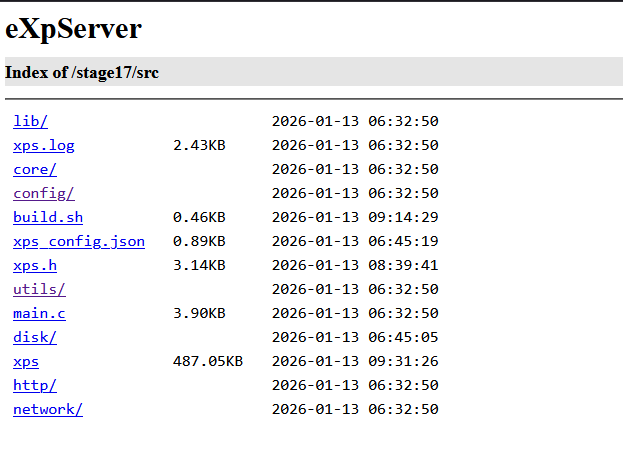
After completing this experiment, your directory listing should display the last modified date and file size for each entry, as shown above.
Conclusion
In this stage, we implemented the xps_directory module to handle directory browsing. When a requested directory lacks an index file, the server now dynamically generates an HTML page listing all files and subdirectories, solving the 404 issue we encountered in Stage 16.
This also marks the end of Phase 2. Throughout this phase, we transformed eXpServer from a basic TCP server into a fully functional HTTP server with dynamic configuration, multiple worker cores, file serving, reverse proxying, and URL redirection.
However, our server currently accepts connections from any client on the network. What if you want to restrict access to only trusted IP addresses within your organization or block known malicious IPs? Think about how you might solve this problem.